
A container is approaching Singapore. The supplier has sent a commercial invoice and packing list. The freight forwarder has provided an arrival update. The warehouse needs to know what is coming, when to expect it and how to prepare for receiving.
The information exists, but it is not necessarily in one place.
Someone must read the documents, compare details, identify what is missing and prepare instructions for the receiving team. This is a common example of repetitive administration where technology can help, provided the final information is reviewed.
Different shipping documents answer different questions
A commercial invoice primarily records information about a transaction, including the parties, goods and invoiced amounts.
A packing list describes how goods are packed and shipped, with relevant quantities, packages and weights.
Other facts, such as the latest estimated arrival time, container identification or delivery arrangements, may come from transport documents, a freight forwarder or the importer's own instructions.
An effective warehouse inbound notice brings together what the receiving team needs. It should not require the team to interpret every original document or make commercial assumptions where details are missing.
What belongs in a warehouse inbound notice?
The format depends on the shipment and receiving arrangements, but a useful notice generally helps staff check:
| Information | What to verify |
|---|---|
| Container or shipment reference | Confirm against transport and shipment records |
| Expected arrival | Use the latest update; distinguish estimates from confirmation |
| Warehouse destination | Check the actual receiving location |
| Product description | Compare with available original documents |
| Packing specification | Preserve the stated configuration and units |
| Carton quantities and weights | Check the packing list and receiving instructions |
| Delivery instructions | Verify unloading, palletisation or other relevant arrangements |
The goal is not to fill every field automatically. It is to make important information visible, including what still needs confirmation.
If the packing list is available but the latest ETA is not, the notice should read “ETA to be confirmed” instead of displaying an invented arrival date.
Four steps from shipping documents to a usable notice
1. Bring the documents into the workflow
Gather the available commercial invoice, packing list and related shipment information. Before uploading genuine documents to any service, confirm that the company is authorised to use it and that access and data-handling arrangements are appropriate.
2. Prepare structured information
Supported software can organise extracted product names, quantities, packing descriptions and other details into reviewable fields. A source document may not contain the latest warehouse destination or delivery instructions, so those may still need to be supplied separately.
3. Review against the source
A person checks the extracted details against the originals and latest operational updates. Pay particular attention to units, carton counts, product descriptions, destination and arrival information.
Finding a number in a PDF does not prove that the number is the correct carton quantity. The label, unit and context still matter.
4. Prepare and share the notice
After review, prepare a consistent operational message for the warehouse. The responsible person checks the final instruction before copying or sending it through the company's agreed channel.
The objective is a clearer handover with less retyping, not fully autonomous messaging.
Why the handover matters more than extraction
Extracting text is only part of the job. Warehouse staff still need to know what action to take.
A notice should make the receiving destination, expected goods, packaging and outstanding checks understandable to the person handling the shipment.
It should also avoid sharing unnecessary sensitive information. A receiving instruction generally does not need every price, payment term or supplier detail in the commercial invoice. The original documents and the operational notice have different audiences and purposes.
How R2U Document Factory fits
R2U Document Factory's Document Essentials workflow is designed around shipping documents and human-reviewed warehouse notices.
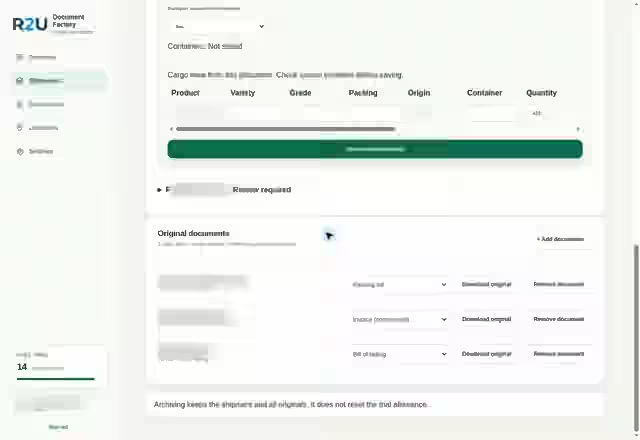
The published description includes uploading supported PDFs and images, preparing extracted details, reviewing and correcting information, and creating a notice that can be copied for operations.
R2U's public website includes a redacted product-interface preview and a separate branded sample shipment. The sample is not an actual customer transaction.
R2U also shows a planned Quote Assist concept for customer quotation drafts. That is a future module, not an activated paid feature. Assess Document Factory on its current document-review workflow rather than assuming additional integrations are already available.
An operational notice does not replace required trade records
Singapore Customs states that traders and declaring agents generally must retain documents associated with purchases, imports, sales or exports for at least five years from the date the permit is approved. These include commercial invoices, packing lists and other supporting documents. See its guidance on retaining trade documents.
An internally prepared warehouse notice is not a substitute for the original supporting records, customs permits or other required documentation. Follow the applicable requirements and store authorised electronic or physical records appropriately.
Frequently asked questions
Can software produce a warehouse notice directly from a commercial invoice?
It may prepare some fields, depending on the document and supported extraction capabilities. The destination, latest ETA and unloading instructions often require separate information and human verification.
Does a packing list always reflect what physically arrives?
Not necessarily. It describes the reported shipment. Appropriate warehouse receiving checks are still necessary.
Does R2U send notices automatically through WhatsApp?
The published Document Essentials workflow prepares a human-reviewed, copy-ready notice. Staff remain responsible for checking and sending it using their chosen channel.
Does the notice replace a customs declaration?
No. An operational notice and customs documents serve different purposes.
THE WORKFLOW IN PRACTICE
Document Factory
The next step is to explore the relevant product and ask how it fits your own operation. Demos and any early-access conditions are confirmed separately.
Explore Document Factory